
Northpass
Make your catalog easier to shop.
Showcase collections, make product differences clear, and help shoppers find options and add-ons that work together.
One Shopify theme. Three presets with the same merchandising tools.
Guided Kit BuilderDriftline example
From browsing to buying
Build a shopping path around the way your customers browse, compare, and buy.
-
Make products easier to find
Group products into useful collections. Help customers narrow their choices with search and filters, or link directly to products from a shoppable photo.
Set up shoppable photos Set up search and filters -
Make differences clear
Compare products side by side using details that matter to your shoppers, such as sizing, materials, or features. Show what a premium option adds.
Set up product comparison -
Help shoppers put items together
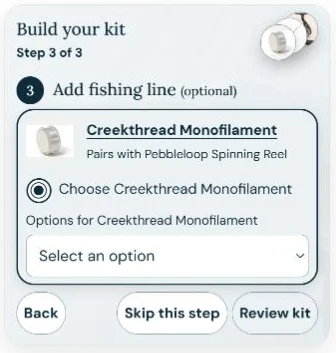
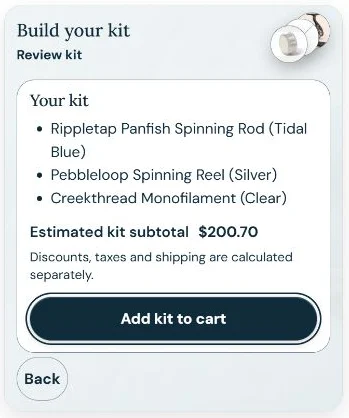
Use Guided Kit Builder to decide which products can be selected together. The options follow the pairings you set. Shoppers can choose variants, skip optional items, and review their kit.
Set up a guided kit -
Make the cart useful
Recommend a related product or useful add-on in the cart. Offer gift messages and, with a wrapping product configured, paid gift wrapping.
Set up cart recommendations and gifting
Plan your merchandising
Start with a collection, a seasonal selection, or a featured item. See how customers find it, compare options, and add what they need on a phone.
Read the merchandising walkthroughGive promos a purpose
Use scrolling text to link to a buying guide or a current offer. Switch to a static message on mobile when you want it easier to read.
Set up scrolling text and promotionsPreview the Northpass presets
Northpass preset
A field-gear storefront for helping shoppers choose packs and equipment by fit, weight, and capacity.

Switchback
A camping storefront with a split desktop banner and room for buying guides that help shoppers plan a complete setup.

Driftline
A fishing storefront with photo menus for browsing tackle and space to guide shoppers through rod, reel, and line choices.

These storefronts are examples. Each preset works with your own products, collections, and menus.
Northpass Help Center
Find setup instructions, merchandising walkthroughs and theme editor help.
Open the Northpass Help Center